MT5 Trade Layering & Risk Management
SherAlgo LayerPro is the MetaTrader 5 Expert Advisor built for disciplined, structured trade execution. Layer trades, scale positions, and control risk from a single collapsible panel — works with any MT5 broker.
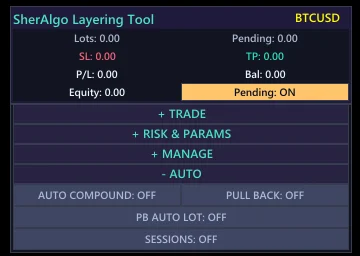

What is SherAlgo LayerPro?
SherAlgo LayerPro is a MetaTrader 5 Expert Advisor (EA) designed for retail and prop-firm traders who use position layering and scaling strategies. Unlike black-box automated bots, LayerPro is a manual-assist execution panel: it organizes manual trade entries, scaling actions, risk limits, and live position monitoring into four collapsible sections inside the MT5 chart window. Traders use it to layer into positions incrementally, lock in breakeven levels automatically, and view live account metrics — balance, equity, floating P/L, and lot exposure — without switching screens. It is compatible with any MT5 broker and does not require a VPS or dedicated server. SherAlgo LayerPro is available via subscription directly at sheralgo.com, with plans starting at $10/month.
Interface Features
Built for Faster Trade Control
A cleaner SherAlgo interface for structured execution, sharper risk control, and quicker trade management
Foldable Control Groups
Keep the panel focused with collapsible sections that reveal advanced tools only when you need them.
Risk & Action Separation
Risk settings stay clearly separated from execution controls, reducing clutter and helping you avoid costly misclicks.
Cleaner Order Flow
Move from setup to execution through a simpler panel sequence built for faster decisions during active sessions.
Quick Chart Inputs
Use chart-based picking for entry, stop loss, and take profit placement without digging through extra controls.
Fast Management Actions
Reach close, cancel, and position-management actions quickly from compact controls designed for live trade handling.
Adaptive Lot Controls
Adjust lot sizing and scaling logic from a streamlined layout that keeps exposure settings easy to review.
Precision Scaling Tools
Refine multi-order placement and last-order scaling from grouped controls that stay readable even in complex setups.
Breakeven & Locking
Protect open trades with breakeven moves and profit or loss locking actions surfaced in the right place.
Compounding Controls
Layer into winning moves with compounding options that fit naturally into the upgraded management workflow.
Live Metrics Snapshot
Monitor balance, equity, floating P/L, lots, and pending exposure from a cleaner at-a-glance account view.
Simplified Progressive Disclosure
The interface shows core actions first, then expands into deeper controls so the panel stays approachable under pressure.
On-Panel Market Context
Keep session lines and EMA overlays close to execution tools so market structure is always visible while you manage trades.
Inspired by Legendary Traders
Built on the principles and strategies of the world's most successful systematic traders
How the Upgraded Interface Flows
Start with the essentials, expand into deeper controls only when needed, and manage trades from a layout built for clarity.
01Install and Launch
Add the EA to MT5, attach it to your chart, and open the upgraded panel with the streamlined home layout ready to use.
02Open Only What You Need
Expand foldable sections as needed, keeping core controls visible first and advanced settings tucked away until they matter.
03Set Risk Before Action
Dial in lot size, scaling, TP, and SL inside dedicated risk controls before moving into execution actions.
04Execute and Manage Fast
Place orders, monitor account metrics, and use quick close or cancel actions from the cleaner management flow.
05Refine Without Clutter
Use the progressive-disclosure layout to reveal compounding, locking, and chart tools only when the trade setup calls for them.
Pricing
Choose Your Winning Plan
Select the perfect plan for SherAlgo LayerPro on one MetaTrader 5 account.
Monthly
Flexible access, cancel anytime.
- 1 MT5 Account License
- Full EA Features
- All Trading Tools
- Risk Management
- Email Support
3 Months
33% savings, full access for 90 days.
- 1 MT5 Account License
- Full EA Features
- All Trading Tools
- Risk Management
- Email Support
6 Months
35% savings, full access for 180 days.
- 1 MT5 Account License
- Full EA Features
- All Trading Tools
- Risk Management
- Email Support
12 Months
63% savings, full access for 365 days.
- 1 MT5 Account License
- Full EA Features
- All Trading Tools
- Risk Management
- Priority Support
- User Manual & Video Tutorial
New buyer? Read the full installation and activation guide in the SherAlgo Install Manual or explore all LayerPro features.
To complete your purchase, click the appropriate payment button above. You will be redirected to a secure payment page to finalize your selected plan. We accept cryptocurrency, PayPal, and major debit or credit cards. If you do not have a PayPal account, you can still pay securely using your card through the PayPal platform.
For crypto payments (USDT or USDC on Tron, BNB Chain, Ethereum, Polygon or Solana), your license key is emailed as soon as your payment is confirmed on-chain. For PayPal payments, our team sends your license key and EA file within 24 hours of receiving your payment. If you do not receive it, please contact [email protected].
All purchases are covered by our refund policy.
SherAlgo Backtest Master
A standalone Windows app to test your MT5 and forex strategies on historical data — fast, fully offline, with detailed reports and equity curves. SherAlgo isn't just a layering EA anymore: you now get a full backtesting desk too.
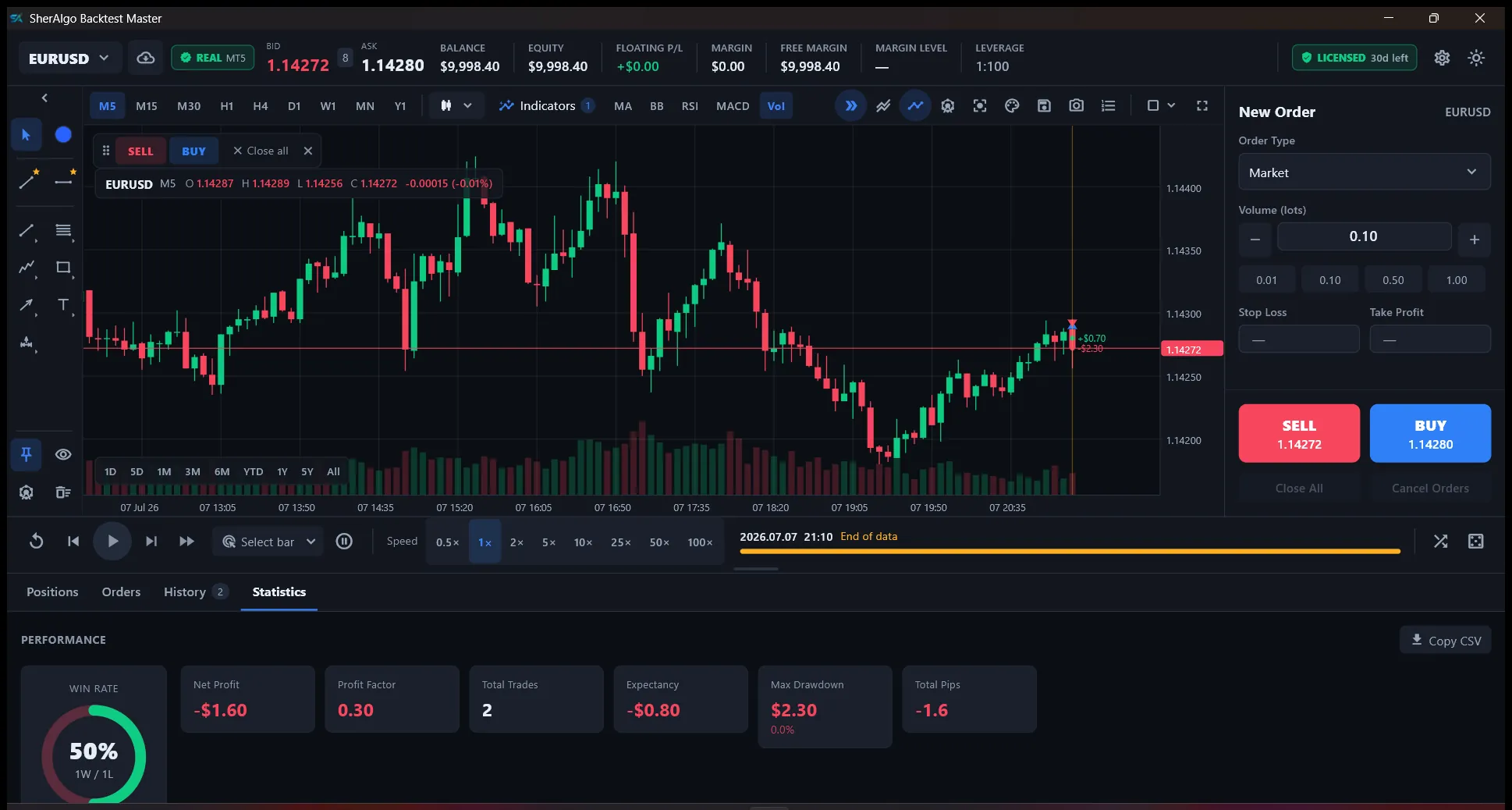
Illustrative sample — your results depend on your strategy and data.
Frequently Asked Questions
Everything you need to know about SherAlgo
What is SherAlgo LayerPro, and how does it help traders?
How do I purchase a SherAlgo plan, and what payment methods are accepted?
What happens after I complete my purchase?
How do I install SherAlgo LayerPro on MetaTrader 5?
What changed in the upgraded SherAlgo interface?
What is the recommended workflow in the new panel?
What are the system requirements for using SherAlgo LayerPro?
Is SherAlgo compatible with my broker, and how do I test it?
Can I use SherAlgo on multiple charts or accounts?
Does SherAlgo LayerPro work with prop firm accounts like FTMO or The5%ers?
What support is available if I have issues with SherAlgo?
Can I switch or upgrade my plan after purchasing?
What should I do if I don't receive the EA file after payment?
What should I do if SherAlgo doesn't work as expected after installation?
Can I use SherAlgo on platforms other than MetaTrader 5, like MetaTrader 4?
Does SherAlgo guarantee profits, and what risks should I be aware of?
Still have questions? [email protected]
MT5 EA Knowledge Hub
Navigate high-intent topics for MetaTrader 5 setup, the upgraded SherAlgo interface, and live support workflows.
MT5 Installation Guide
Step-by-step setup, WebRequest configuration, and first-run checks for SherAlgo on MetaTrader 5.
ExploreEA Feature Breakdown
Explore the upgraded modular panel, foldable sections, streamlined actions, and the legacy power features behind them.
ExploreTroubleshooting Center
Error-first support playbooks for licensing, execution failures, spread filters, and risk lock states.
ExploreDocumentation Hub
Deep technical reference for the new panel workflow, configuration paths, licensing flow, and operational behavior.
ExploreEA Changelog Updates
Track the latest UI upgrade, release notes, and behavior changes before adjusting production settings.
ExploreLegendary Trader Profiles
Study strategy principles and map them to structured MT5 execution workflows.
ExploreDisclaimer
Trading foreign exchange on margin carries a high level of risk and may not be suitable for all investors. The high degree of leverage can work against you as well as for you. Before deciding to trade foreign exchange, you should carefully consider your investment objectives, level of experience, and risk appetite. The possibility exists that you could sustain a loss of some or all of your initial investment and therefore you should not invest money that you cannot afford to lose. You should be aware of all the risks associated with foreign exchange trading and seek advice from an independent financial advisor if you have any doubts. The SherAlgo LayerPro is a trading assistant tool and does not guarantee profits. Users are responsible for their own trading decisions and risk management. For full details, see our Risk Disclosure.
Disclaimer
Trading foreign exchange on margin carries a high level of risk and may not be suitable for all investors. The high degree of leverage can work against you as well as for you. Before deciding to trade foreign exchange, you should carefully consider your investment objectives, level of experience, and risk appetite. The possibility exists that you could sustain a loss of some or all of your initial investment and therefore you should not invest money that you cannot afford to lose. You should be aware of all the risks associated with foreign exchange trading and seek advice from an independent financial advisor if you have any doubts. The SherAlgo LayerPro is a trading assistant tool and does not guarantee profits. Users are responsible for their own trading decisions and risk management. For full details, see our Risk Disclosure.